
Sign Up

Sign Up to our social questions and Answers Engine to ask questions, answer people’s questions, and connect with other people.

Have an account? Sign In


Have an account? Sign In Now

Sign In

Login to our social questions & Answers Engine to ask questions answer people’s questions & connect with other people.

Sign Up Here


Forgot Password?

Don't have account, Sign Up Here

Forgot Password

Lost your password? Please enter your email address. You will receive a link and will create a new password via email.


Have an account? Sign In Now

You must login to ask a question.


Forgot Password?

Need An Account, Sign Up Here

Please briefly explain why you feel this question should be reported.

Please briefly explain why you feel this answer should be reported.

Please briefly explain why you feel this user should be reported.

Sign InSign Up

BIM Help Center

BIM Help Center Logo BIM Help Center Logo

BIM Help Center Navigation

  • Home
  • Contact Us
Search
Ask A Question

Mobile menu

Close
Ask A Question
  • Home
  • Contact Us
Home/ Questions/Q 1642

BIM Help Center Latest Questions

Amir Shirzadi
  • 0
  • 0
Amir ShirzadiPundit
Asked: March 4, 20262026-03-04T12:32:11+00:00 2026-03-04T12:32:11+00:00In: Autodesk Revit

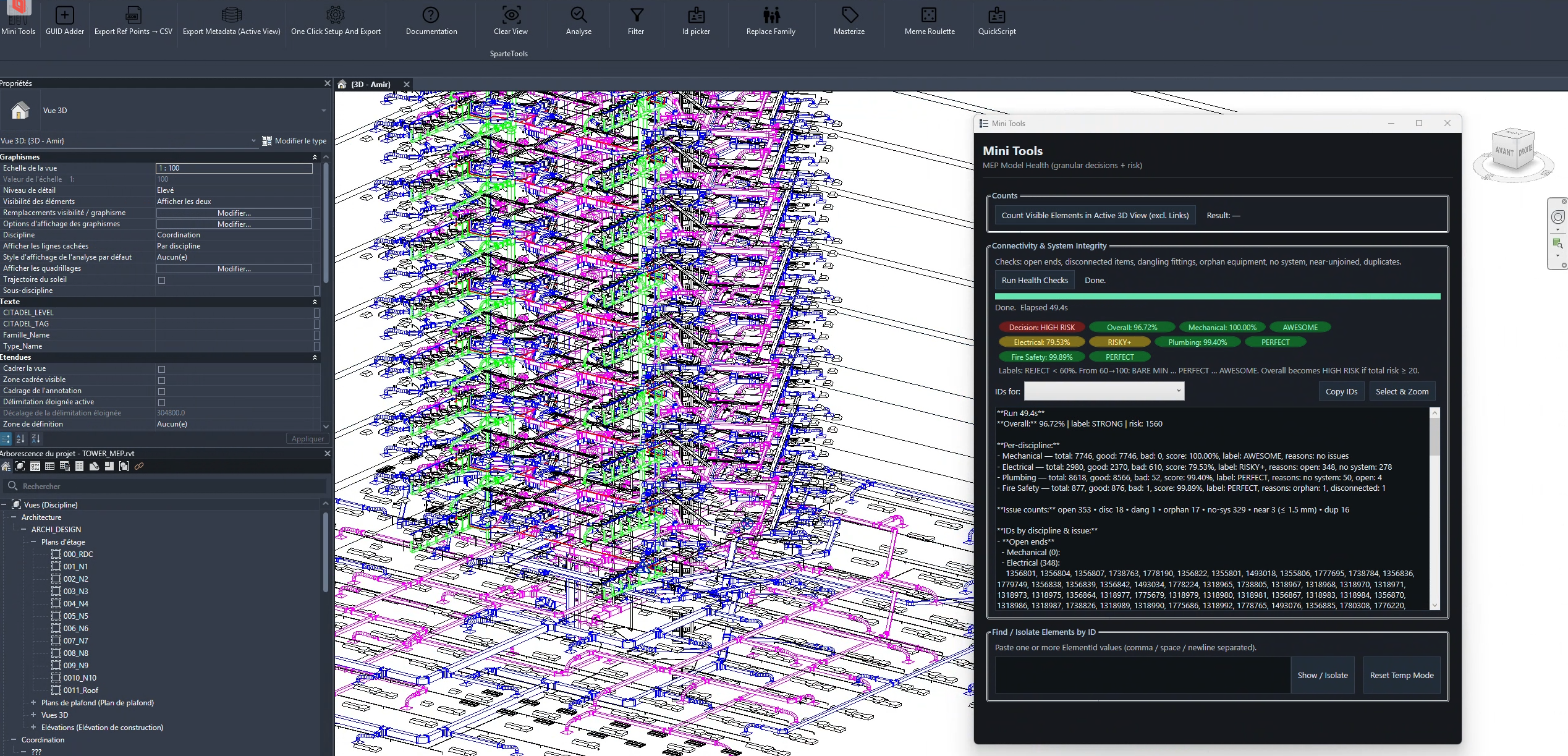
common problems i keep finding in revit mep models

  • 0
  • 0
common problems i keep finding in revit mep models

while reviewing different revit mep models, I keep noticing the same types of modeling issues appearing again and again.

some of the most common ones:

• open connectors / open pipe or duct ends
sometimes pipes or ducts are left with open connectors.
impact: systems may not calculate correctly and the network remains incomplete.

• fully disconnected elements
elements that are placed in the model but not connected to anything.
impact: they don’t actually belong to any working system and can easily go unnoticed.

• dangling fittings
fittings where one connector is left open.
impact: usually a sign that the system modeling is unfinished.

• orphan equipment
equipment families placed in the model but not connected to any system.
impact: they won’t behave correctly in system analysis or calculations.

• elements with no system assigned
pipes, ducts, or equipment without a system name.
impact: this can affect schedules, calculations, and overall system organization.

• connectors that are very close but not actually joined
sometimes elements look connected visually but are slightly misaligned.
impact: the system appears correct in the model, but technically it’s still disconnected.

• duplicate elements in the same location
two identical elements placed on top of each other.
impact: this can lead to incorrect quantities, coordination issues, or confusion later.

individually these might seem like small issues, but they often cause bigger problems later with system calculations, schedules, coordination, and overall model reliability.

i’m curious about the experience of other bim / mep engineers.

what are the most common issues you usually run into in revit mep models?

  • unconnected systems
  • wrong system classifications
  • duplicate elements
  • missing flow parameters
  • poorly built family connectors

it would be great to hear what kinds of checks you find most useful when doing mep model qa/qc.

bimbimmanagementmepmepengineeringrevitrevitmep
  • 0 0 Answers
  • 19 Views
  • 0 Followers
  • 0
Share
  • Facebook
  • Report
Leave an answer

Leave an answer
Cancel reply

Browse

Sidebar

Ask A Question
  • Popular
  • Answers
  • dandy.bo

    Latest and useful Revit Plugins for BIM Managers ?

    • 6 Answers
  • rmarcel

    Working with Point Cloud in Dynamo ?

    • 3 Answers
  • carina_marsi

    Experience with “Undet Point Cloud” for Revit ? Alternatives ?

    • 3 Answers
  • Amir Shirzadi
    Amir Shirzadi added an answer from my experience, working with large point clouds in recap… March 4, 2026 at 2:24 pm
  • Amir Shirzadi
    Amir Shirzadi added an answer Works really well with large point clouds. October 21, 2025 at 10:06 am
  • Amir Shirzadi
    Amir Shirzadi added an answer I tried Leica CloudWorx (not the latest version) for importing… October 21, 2025 at 10:04 am

Related Questions

  • Metadata Not Exporting via Datasmith in Revit (Using Twinmotion Plugin)

    • 1 Answer
  • Advanced Understanding and Management of MEP Systems in Revit

    • 0 Answers
  • Experience with “Undet Point Cloud” for Revit ? Alternatives ?

    • 3 Answers
  • Need a Revit Architecture Template - Anyone Got One to ...

    • 0 Answers
  • Importing DGN Files into Revit

    • 0 Answers

Trending Tags

ai architecture bim bimroles cad careerpaths contour contourlines datasmith dgn dynamo export infraworks mep photogrammetry plugin pointcloud pointclouds revit revitmep topo

Explore

  • Home
  • Categories
  • Questions
    • New Questions
    • Trending Questions
    • Must read Questions
    • Hot Questions
  • Polls
  • Tags

Footer

BIM Help Center

Thank you for visiting our website. We strive to provide a platform where professionals and enthusiasts can exchange knowledge, tips, and solutions related to Building Information Modeling. Our goal is to foster a supportive community that promotes learning and growth in this field. We welcome your questions, comments, and suggestions. Please feel free to contribute and help us make this website a valuable resource for all.

Social media

© 2023 BIM Help Center. All Rights Reserved.

Insert/edit link

Enter the destination URL

Or link to existing content

    No search term specified. Showing recent items. Search or use up and down arrow keys to select an item.